Installing WebCopier on Windows
Calm, factual guidance. No marketing claims.
Download WebCopier_1.4.0_x64-setup.exe WhatsApp support
Supported Windows versions
- Windows 10 (64-bit), version 1809 or newer
- Windows 11 (64-bit)
System requirements
- About 1.2 GB free disk for the installer + installed app (includes bundled Chromium for capture)
- 8 GB RAM recommended (4 GB minimum for small sites)
- Internet connection for license sign-in and first download
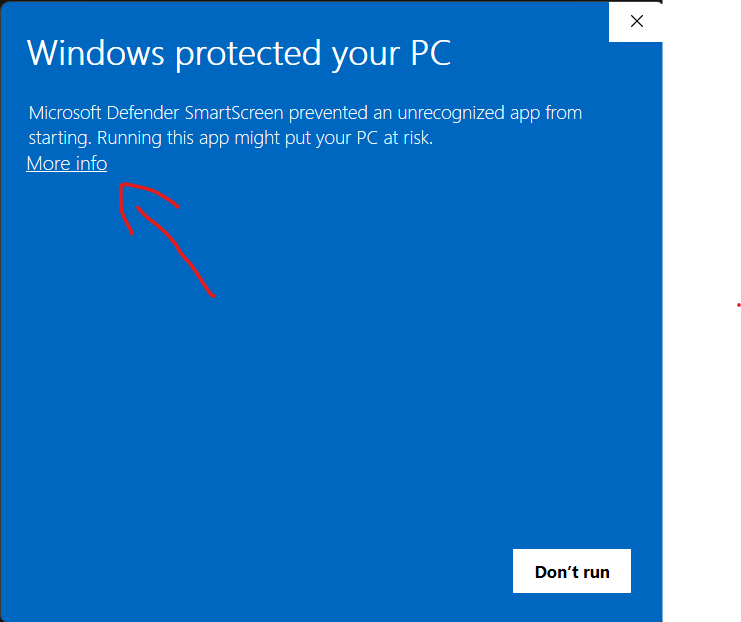
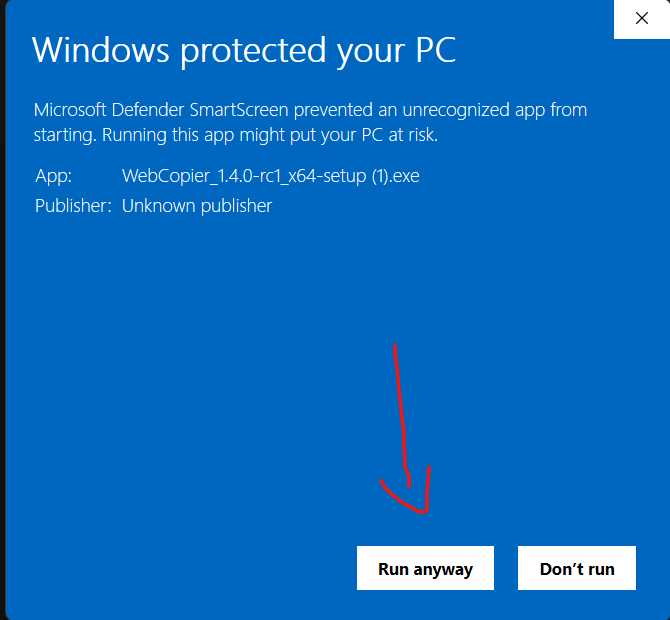
1. SmartScreen: “Windows protected your PC”
Unsigned installers often trigger Microsoft Defender SmartScreen.
- Click More info
- Click Run anyway
2. Windows 11 Smart App Control
On some Windows 11 PCs, Smart App Control blocks apps that are not from a recognized publisher. Microsoft does not provide a simple reversible toggle: turning Smart App Control off is done in Windows Security → App & browser control → Smart App Control settings, and Microsoft documents that turning it back on later may require reinstalling Windows. That is a Windows limitation, not a WebCopier setting.
Only change this if you understand the trade-off and choose to. We do not change Smart App Control for you.
3. Antivirus false positives
Some antivirus tools flag new unsigned installers. If your antivirus quarantines the download, restore the file from quarantine
or add a temporary exception for the installer path, then run it again. Prefer the official file named
WebCopier_1.4.0_x64-setup.exe from webcopier.tools.
After install
- Open WebCopier from the Start menu
- Sign in or use the free plan
- Future updates can install from inside the app without repeating the SmartScreen flow
Still stuck? WhatsApp support.